Welcome to the second day of our 10 Days to a Healthier Website series, designed to help you kick off 2026 with an easy, no-nonsense, guide to looking at some key aspects of your current website and marketing.
The importance of a robots.txt
If the first post in the series was an easy start, today's post doesn't really get much more difficult - we're checking your site's robots.txt. This little file sits on your server and tells search engines where they can and can't go on your site. Let's figure out if you've got one, what it should contain, and whether it's working properly.
What is a robots.txt file anyway?
Your robots.txt file is basically a set of instructions for search engine bots. It lives in the root directory of your website and acts like a bouncer at a club - it tells Google, Bing, and other crawlers which parts of your site they're allowed to index and which bits to skip.
Without one, search engines will attempt to crawl everything on your site. That's usually fine, but sometimes you'll have areas you don't want indexed - staging environments, admin pages, duplicate content, that sort of thing. That's where robots.txt comes in handy.
Checking if you have one
This is the easy bit. Open your browser and type your domain followed by /robots.txt. So if your site is example.com, you'd visit example.com/robots.txt.
If you see a file with some text in it, brilliant - you've got one. If you get a 404 error, then you don't have a robots.txt file yet. Don't panic. Most small websites don't have one, and they get along just fine.
What should be in it?
A basic robots.txt looks something like this:
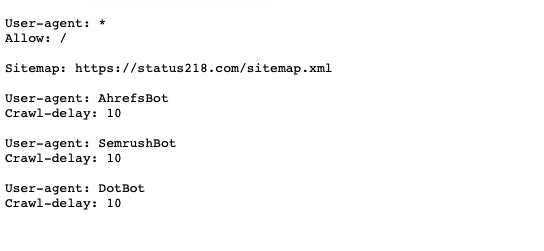
The User-agent: * means it applies to all search engine bots. Allow: / tells them they can crawl the whole site by default. The next line tells the robots where they can find the website's sitemap. Thereafter, it's specific instructions to specific bots to slow them down a little bit.
If you don't have anything you specifically want to hide, a minimal file can be as simple as:
User-agent: *
Allow: /
Or you might not need one at all.
Do you actually need one?
Here's the thing: if your site is a straightforward public website with no admin areas exposed to the public, no duplicate content issues, and no staging environments live on the same domain, then you probably don't need a robots.txt file. Search engines are smart enough to figure things out without one.
Where it becomes useful is if you've got a WordPress site with /wp-admin/ visible to crawlers, or if you're hosting staging and live versions on the same domain, or if you've got hundreds of filter pages creating duplicate content. In those cases, a robots.txt file is worth having. Wordpress does respond with a default robots.txt file, but it may not be up to the task.
What if you do have one?
If you've already got a robots.txt file, check it over. Are you blocking anything you shouldn't be? A common mistake is accidentally blocking your entire site with something like:
User-agent: *
Disallow: /
That would tell search engines not to index anything. If you're wondering why Google isn't ranking your pages, this could be your culprit.
You can test your robots.txt file using Google's robots.txt tester in Google Search Console. It'll show you exactly what the bot is allowed to crawl.
The bottom line
Most websites don't need a robots.txt file and do absolutely fine without one. If you've got one, make sure it's not accidentally blocking anything important. If you don't have one and your site's just a straightforward brochure site or blog, you're not missing out on anything, but if it's a bit more complex, you probably need one.
If you're unsure whether you need one, or you suspect yours might be causing issues, get in touch and we'll take a look for you. It only takes a minute to sort out, and it could be the difference between your site getting indexed properly and Google scratching its head.
Missed the start? Catch up with Day 1: Measuring Your Site's Speed.
Next up, we look at sitemaps in Day 3 of our 10 Days to a Healthier Website series.