Let's start with Schema markup
There can be a degree of confusion, when talking about this topic, because there's a lot of interplay between something called Schema Markup and Rich Results, but they're not quite the same thing.
You may also see reference to "Rich Snippets", which is just what Rich Results were called up until about 2000, but for our purposes, Rich Snippets and Rich Results are one and the same thing.
Schema markup is a way of marking up information that is on your website (whether that information is visible to visitors or not) to highlight to the search engines that this bit of information is the name of something, and that bitis the description of something, and so on.
As an example, let's assume you're running an e-commerce website and you sell widgets. What the visitor sees on a typical product page will include, amongst other things, the name of the widget, its price, perhaps a discounted price because they're on sale until the end of the month, how many you've got in stock (and whether they're in / out of stock), maybe some photos of the widget, and possibly some reviews of the widget from existing customers.
If you don't use Schema markup, then you are reliant upon the search engine spiders looking at the page and determining which bit is the price, which bit is the product image, and so on, which isn't ideal. Because Schema markup can also highlight information to the spiders even if that information isn't actually visible to the users, you're not limited to just the information that is visible on screen.
How does Schema markup work?
As its name suggests, Schema markup works by 'marking up' information that's included in the page.
At its top level, a page may cover one or more "Things" (in Schema's terminology). That could be a blog post, a product, a company, a local business, a person - there are literally dozens of "Things".
Each "Thing" can then have one or more attributes. Since we've used the example of a product above, let's stick with that. A "Product", in Schema's terms, can be associated with a Brand (which can, itself, be another "Thing"). It can have an "Offer" (yes, another thing) - in essence, its price and availability. It can have a SKU, weight, an image, a description, a URL, a name...there are any number of attributes that it can have.
A really pared-down version of the HTML of product page might look something like this :
<div>
<h1>Widget Name<<h1>
<p>This is the description of our widget</p>
<p>Price : <span>£20.00</span></p>
<p>Availability : <span>In stock</span></p>
<img src="widget.jpg" alt="An image of our widget" />
</div>
Within that, the user would see the name, the description, the price, the availability, and an image of the product.
To implement Schema markup, again at the most simple level, we simple just add in a bit of information so that the HTML looks like this :
<div itemscope itemtype="https://schema.org/Product">
  <h1 itemprop="name">Widget Name</h1>
  <p itemprop="description">This is the description of our widget</p>
  <p>Price : <span itemprop="price" content="20.00">£20.00</span></p>
  <meta itemprop="priceCurrency" content="GBP">
  <p>Availability : <span itemprop="availability" content="https://schema.org/InStock">In stock</span></p>
  <img itemprop="image" src="widget.jpg" alt="An image of our widget" />
</div>
Note that - in passing - the better way to use Schema is to add the relevant information to the top of your page, but for demonstration purposes, it's easier to show the above - it has the same end result.
The key thing to stress is that this doesn't change how the visitor sees the page in any way. All we're doing is telling the spiders "this bit of the page relates to a product" (on the first line). Then, on the next line, we're telling them "this is the product's name", likewise for the description, the price, the availability and so on. The newly-introduced meta tag for priceCurrency doesn't add anything to the page either, it just makes it clear that the price of the product is measured in Sterling.
Why should your bother with all this?
Any number of reasons, really!
The first is that the more you can tell search engines what information's what, the better, rather than rely on them to divine it from the contents of your page.
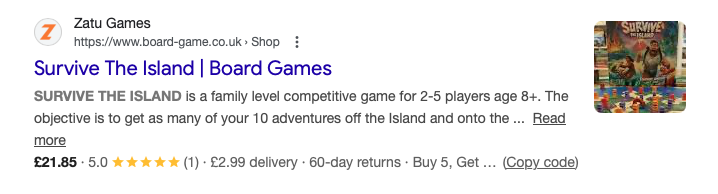
The second is because they will use that information - you know when you search for something and in the results you see things like the price, delivery cost, star ratings, etc? Well, that's the Rich Results - that's Google (or Bing, or whomever) enhancing the results that they show to their users based on the information that you've marked up on your site, like so :
The third is because you're already outputting the majority of this information to visitors to your website anyway. Adding in the markup is a relatively simple task and once it's done, it's done.
How do I know if we've got any Schema markup on our site?
A lot of platforms will include some Schema markup out of the box. The easiest way to see if you have any - and if there are any errors in any that you may already have - is to use Google's Rich Results Test. Just pop your site's address in there, and it'll tell you what you've got, any information that may be missing, and any information that malformed.
Note that the Rich Results Test doesn't look for all types of Schema markup, just those which Google will use for presentation in its search results, so there may be markup present which doesn't reflect in the results.
What sort of things should we be looking to cover?
Well, where to start...details of your business organisation, at a bare minimum, and the products and / or services which you offer. If you have product reviews (or testimonials) then those should definitely be marked up, likewise key selling points. If you have profile pages of people in your organisation, then those should be marked up. Local SEO (as we'll cover later in this series) is a great one to target via Rich Results.
There's a big ol' list, really, and if you want to be sure if you're marking anything up - and some pointers on what you should be marking up - then feel free to get in touch with us.
Missed the previous post? Catch up with Day 4: Broken Links.
Next up, we look at Google Analytics in Day 6 of our 10 Days to a Healthier Website series.
For a deeper look at rich snippets and how they can boost your visibility in search, see our dedicated posts on Rich Snippets: Boost Your Site's Visibility and Rich Snippets: Your Secret Weapon for Standing Out in Search Results.